Replication > ReplValidator Utility > Creating the Configuration File

Creating the Configuration File

To run the ReplValidator utility you must have a valid .xml configuration file that lists the sites and services to be compared, and how validation between the primary (source) services and the replicated (destination) services will be performed. The ReplValidation configuration file also defines an output file location, the number of simultaneous comparisons, whether to autostart, the maximum number of records to compare, the maximum number of missing records, the number of iterations, how to iterate, and any table exclusions.

See the following subsections for more information:

To Create or Edit a Configuration File

  1. Select File > Create Config… (or Ctrl+C) to create a new configuration file or
    select File > Open Config… (or Ctrl+O or click Open Config (Open Config) on the toolbar) to open a previously created configuration file or
    select File > Edit Config… (or Ctrl+E) to edit an open configuration file to view the Create/Edit Configuration dialog box.
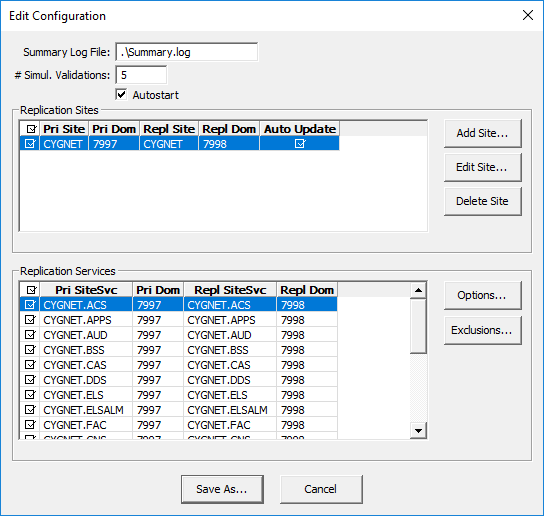
  2. Configure the settings on the Create/Edit Configuration dialog box using the properties described below.
  3. The Replication Sites pane is where you add, edit, and delete the replication sites to be compared:
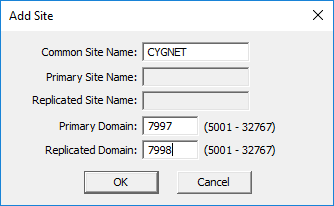
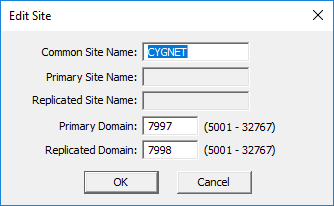
  1. Click Add Site or Edit Site to add a site and configure the following properties for each site (described below):

Config File Add Site   Config File Edit Site
Configuration File Add / Edit Site

  1. Click OK to accept the properties. The Replication Sites and Replication Services information will be added to the two panes of the Create/Edit Configuration dialog box.
  2. Click Delete to remove a site from the configuration.
  3. To specify automatic validation once configuration is complete, click Auto Update within the Replication Sites pane. Note the following:
  1. To exclude a site pair from validation, deselect the check box on the left of the Replication Sites pane.
  2. If you have more than one site pair in the Replication Sites pane you can reorder them using the +/- keys on your keyboard.

Edit Configuration
Create / Edit Configuration

  1. You can apply additional options to the Replication Services list for individual services:
  1. To exclude a service pair from validation, deselect the check box on the left of the Replication Services pane.
  2. To reorder the service pairs use the +/- keys on your keyboard.
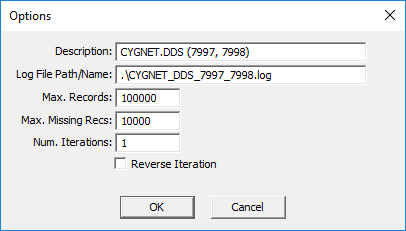
  3. Select a service pair and click Options to configure record and iteration option for that service. The properties are described below.

Config File Site Options
Configuration File Options

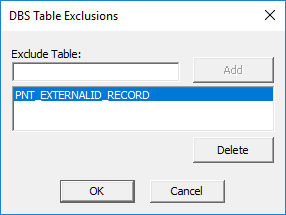
  1. Select a service pair and click Exclusions to exclude specific database tables from the validation.
  2. Note: This option only applies to DBS-Based Services. The button is disabled for non-DBS services.

Config File Site Exclusions
Configuration File DBS Table Exclusions

  1. When done, click Save As to access the Save As dialog box to type a file name and specify the directory location to which to save the .xml configuration file

Create/Edit Configuration

The properties on the Create/Edit Configuration dialog box are described in the following table.

Parameter Required Default Value Description XML Attribute

Summary Log File

Yes

.\Summary.log

The directory location where the summary log files will be saved.

Note: Change this property to avoid writing the log files to the same folder from where ReplValidator.exe is run.

SummFile

# Simul. Validations

Yes

5

The number of simultaneous validation comparisons to be performed at any time.

MaxRunningSites

Autostart

No

not selected

Indicates whether to start comparing sites automatically once validation is configured and saved.

AutoStart

Replication Sites > Add Site / Edit Site

The properties on the Add / Edit Site dialog box are described in the following table.

Parameter Required Default Value Description XML Attribute

Common Site Name

Yes

-

The site name of the primary and replicated services, which must be the same.


Primary Site

Yes

-

The name of the primary site. Will be grayed out if the Common Site Name is populated.

PriSiteName

Replicated Site

Yes

-

The name of the replicated site. Will be grayed out if the Common Site Name is populated.

ReplSiteName

Primary Domain

Yes

-

The Domain ID of the primary site.

PriDomain

Replicated Domain

Yes

-

The Domain ID of the replicated site.

ReplDomain

Replication Services > Options

The properties on the Options dialog box are described in the following table.

Parameter Required Default Value Description XML Attribute

Description

No

<site>.<service> (<pri domain>, <sec domain>)

A description of service and domains to be compared.

Desc

Log File Path/Name

No

.\<site>_<service>_<pri domain>_<sec domain>.log

The directory location where the logging and results for the service will be saved.

Note: Change this property to avoid writing the log files to the same folder from where ReplValidator.exe is run.

OutputFile

Max. Records

No

Ignored, compares entire database

The maximum number of records to compare.

MaxRecs

Max. Missing Recs

No

Ignore, compare entire database

If the number of mismatches reaches this number, then the comparison for that service will stop.

MaxMisAllowed

Num. Iterations

No

1

The number of times to compare the services.

NumIters

Reverse Iteration

No

not selected

If selected (true), the database records will be compared newest to oldest. Most often used for the ELS and AUD services.

If not selected (false), the database records will be compared oldest to newest.

RevIter

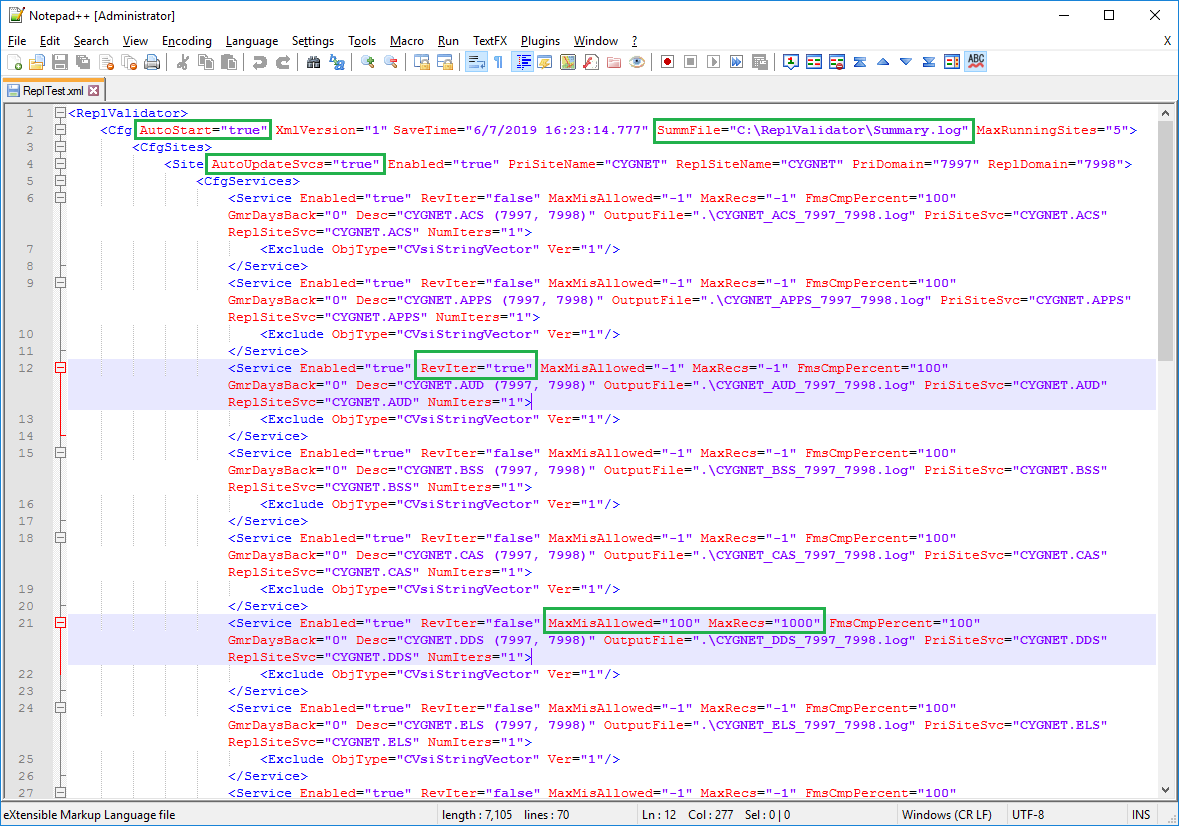
Sample Configuration File

The following example configuration file was generated by the ReplValidator. Click the following image for more information:

Click for more information
Sample Configuration File
Back to top

Let us know how we can improve this topic.

CygNet at weatherford.com

© 2020 Weatherford. All rights reserved.